Mastering Slack in 2026: How to Build a Custom Slack AI Agent Without Writing Code
Learn how to build a custom Slack AI agent without coding. See how Slack becomes an AI execution layer, automate workflows, reduce repetitive tasks, and improve team productivity with simple no-code tools like BoundBot.
24 Apr 2026•5 min read

SEO & Content Marketing Specialist
Why Slack Has Become an AI Execution Layer Not Just a Chat Tool
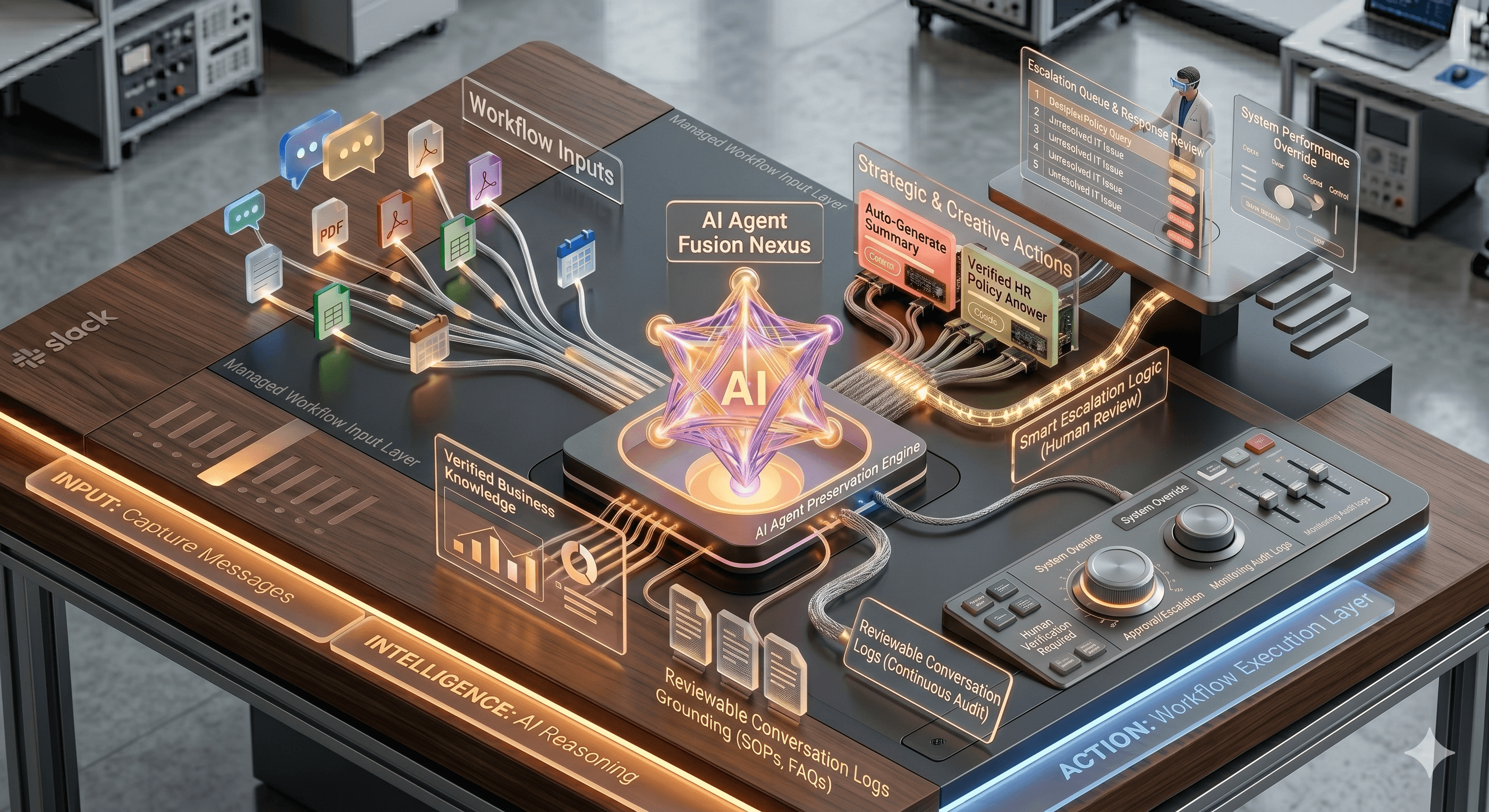
If you’re trying to understand how a Custom Slack AI Agent changes daily work in 2026, it helps to stop thinking of Slack as just a messaging app. In most teams today, Slack is where real work happens. People do not just chat there. They make decisions, share updates, and solve problems in real time. Now with AI added into the mix, some of that work can happen automatically inside the same space.
A Custom Slack AI Agent simply helps teams by handling small repeated tasks inside Slack. For example it can answer common questions, pull simple information from shared files, or help new team members find what they need without waiting for a reply.
You can already see this in many workplaces:
- Support teams getting quick answers to repeated questions
- HR teams helping new employees without manual replies
- Project teams getting summaries instead of reading long chat threads
This is not something far in the future. It is already being used in real teams today.
The reason this is becoming popular is because tools like Slack itself along with simple automation platforms such as Zapier, Make, n8n, and tools like BoundBot make it possible to connect Slack with simple automated actions without needing coding skills.
What a Custom Slack AI Agent Actually Does in Real Workflows
A Custom Slack AI Agent may sound technical, but in real work it acts like a smart teammate inside Slack. It reads messages, understands what people are asking, and decides what to do next instead of just giving a fixed reply.
This is what makes it different from a normal Slack bot. A bot follows a simple rule. If someone types a specific command, it gives a preset answer.
An AI agent works differently. It looks at the message, understands the meaning, and then chooses the best way to respond.
How it actually works behind the scenes
In a real Slack workflow, the process is a bit smarter than it looks:
- A team member sends a message
- The agent understands the intent of that message
- It checks available sources like documents, past messages, or connected tools
- It decides what action is needed
- It completes the task and then replies with the result
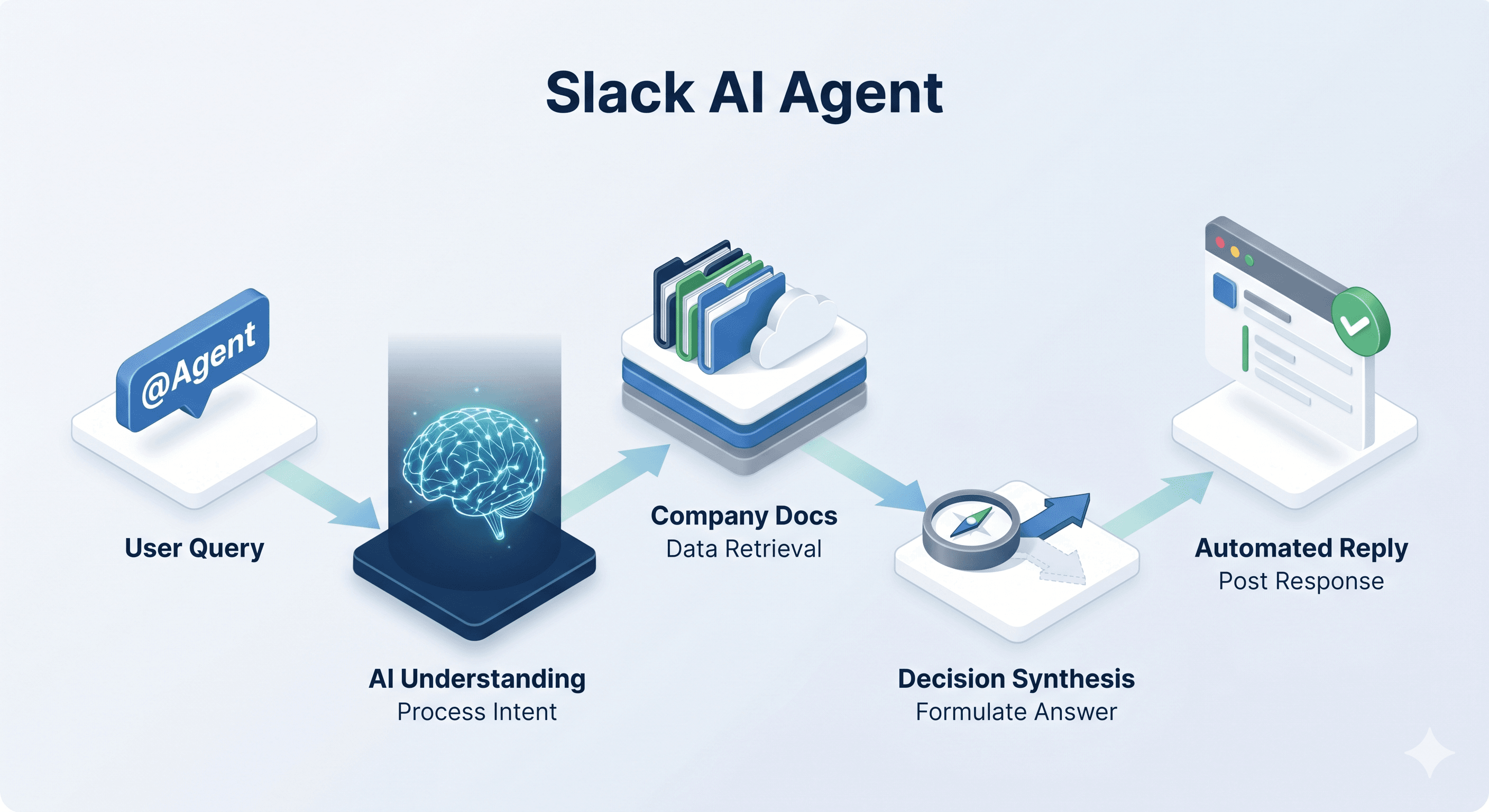
Slack AI Agent process from user query to automated response with AI decision-making
Instead of doing just one step, it can handle multiple steps before responding.
For example, if someone asks a product question, the agent might:
- search internal documentation
- check past support cases
- combine the information
- then send one clear answer
All of this happens in a few seconds inside Slack.
What a Custom Slack AI Agent can really do
In real teams, the agent is not just answering questions. It can:
- search across messages, files, and tools
- summarize long Slack threads
- create tickets or tasks
- route requests to the right team member
- prepare updates or reports
Slack itself supports these kinds of actions through AI features and integrations with other tools.
What this looks like in real team workflows
To understand the real impact of a Custom Slack AI Agent, it helps to compare how daily work actually happens inside Slack with and without it.
Swipe to view all columns →
| Workflow Step | Without AI Agent | With Custom Slack AI Agent |
|---|---|---|
| Question asked | A team member asks a question and waits for someone to respond | The agent reads the question and understands what is being asked instantly |
| Finding the answer | Someone searches through messages, files, or asks others for help | The agent checks past messages, documents, FAQs, and connected tools automatically |
| Response speed | Replies depend on availability and can take time | Answers are delivered within seconds |
| Answer quality | Responses may vary depending on who replies | Answers stay consistent because they come from shared company knowledge |
| Handling repeated questions | The same questions are answered again and again by different people | Repetitive questions are handled automatically without extra effort |
| Real example | A support member sends a general FAQ link that may not fully help | The agent understands the exact question, gives a clear answer, adds context, and assigns it if needed |
In a busy Slack workspace, small delays and repeated tasks build up quickly. People spend time waiting, searching, and re-explaining things that have already been answered before.
A Custom Slack AI Agent removes that friction. It makes sure answers are available right away, keeps information consistent, and reduces the need for constant back-and-forth.
Over time, this changes how teams work. Slack becomes more than a place for conversation. It becomes a place where problems get solved the moment they are raised.
How a No-Code Slack AI Agent System Works (Simplified Architecture)
A Custom Slack AI Agent may sound complex at first, but in reality, it follows a very simple flow. It listens to messages, understands what the user wants, and then responds or takes action automatically. No coding is needed, just connected tools working together in the background.
Every time someone sends a message in Slack, the system immediately captures it. This message is then sent to an AI model that tries to understand the meaning behind the question. Instead of only reading words, it looks at context and matches the request with available information like documents, FAQs, or past Slack conversations.
Once it understands the request, the system decides what to do next. If the answer is clear, it responds directly inside Slack. If the question needs more context or is uncertain, it can forward it to a human team member instead of guessing.
The system works in three simple layers
- Input Layer: Captures messages from Slack instantly
- Intelligence Layer: Understands the question and finds relevant information
- Action Layer: Sends a reply, shares a resource, or triggers an action
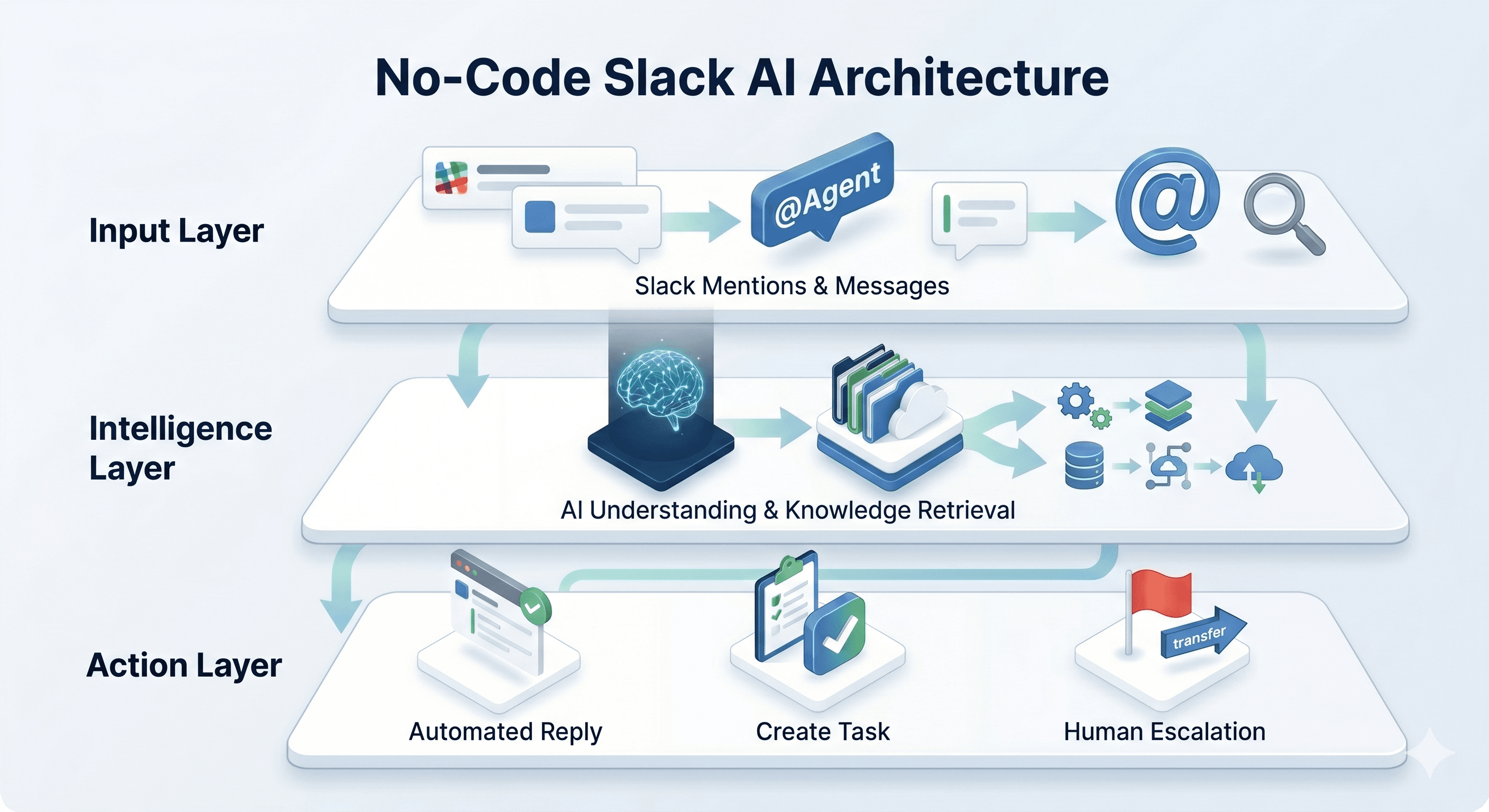
No-code Slack AI architecture with input, intelligence, and action layers workflow
To make this possible without writing code, tools like Zapier, Make, n8n, or platforms like BoundBot style systems connect Slack with your data and workflows. These tools act like bridges between different systems, allowing information to move automatically.
In real use, this process feels instant. For example, if someone asks “Where can I find the leave policy?”, the system reads the question, finds the correct document, and replies with the exact link along with a short explanation. No manual searching is needed.
How to Build a Custom Slack AI Agent Without Writing Code (Step by Step Workflow)
From our experience building and testing no-code AI workflows inspired by BoundBot-style systems, a Custom Slack AI Agent is not just an automation feature. It is a structured conversation system designed to control how information flows inside Slack, from the moment a message is sent to the moment a response is delivered or escalated.
Unlike basic Slack bots that only reply to keywords, this setup focuses on end-to-end conversation management, where every message is processed with context, business knowledge, and controlled AI reasoning.
Step 1: Connect Slack as the controlled entry point
The first step in our workflow is connecting Slack to a no-code automation platform.
Once connected, Slack becomes the official entry point for all selected conversations. We usually start with internal support or HR channels, because these contain repetitive queries that are ideal for automation.
At this stage, Slack is not just a chat tool anymore. It becomes a structured input system where every message can trigger an AI-powered workflow.
Step 2: Capture messages and preserve conversation context
In real implementations, the biggest difference between a basic bot and a production-grade Slack AI agent is context handling.
Our system:
- captures messages in real time
- groups related messages within the same thread
- preserves conversation history for better reasoning
This is important because most AI systems fail when they treat every message in isolation. Context is what allows the agent to understand intent, not just words.
Step 3: Ground the agent with verified business knowledge
This is the foundation of accuracy.
We connect the AI agent to structured, verified internal data such as:
- company SOPs and policies
- HR and onboarding documents
- internal help guides
- resolved Slack conversations
Without this grounding layer, AI systems tend to generate generic or incorrect responses. With it, the agent becomes a reliable extension of your internal knowledge base.
This is also where many Slack AI systems fail in real-world usage, because they skip proper grounding and rely only on general AI models.
Step 4: AI reasoning and controlled decision layer
Once grounded data is in place, the AI processing layer takes over.
In our workflow, the system:
- interprets user intent with context awareness
- retrieves relevant information from connected sources
- removes irrelevant or conflicting data
- generates a structured and context-aware response
We also define system instructions carefully to ensure the AI behaves consistently in tone, accuracy, and escalation logic across all conversations.
This step is what separates a simple chatbot from a controlled AI agent system.
Step 5: Response generation with smart escalation logic
A production-grade Slack AI agent is not designed to answer everything automatically.
Instead, it makes decisions.
Our system can:
- respond directly with verified answers
- include links, documents, or summaries
- escalate complex or sensitive queries to a human teammate
This hybrid model ensures that automation improves speed, while humans still handle judgment-heavy cases.
Without this layer, AI systems often become unreliable in real business environments.
Step 6: Monitor and control conversations in real time
From our implementation perspective, visibility is non-negotiable.
We always include a monitoring layer where every Slack conversation is logged and reviewable. This allows teams to:
- audit AI responses
- correct inaccurate outputs
- improve knowledge sources continuously
- intervene when human control is needed
This is what ensures the system stays trustworthy over time instead of becoming a “black box.”
Step 7: Activate and run as a live workflow system
Once everything is tested and refined, we activate the workflow in production.
From that point, every Slack message follows a structured lifecycle:
Slack message received → context captured → AI reasoning applied → response generated or escalated → conversation logged for review
In real use, this transforms Slack from a communication tool into a managed internal intelligence system where repetitive questions are handled automatically and consistently.
Why a Custom Slack AI Agent Is Replacing Traditional Internal Workflows
Once you understand how a Custom Slack AI Agent is built, the next question is why teams are moving toward it instead of relying on traditional Slack communication.
From our experience, the shift is not about AI hype. It is because Slack naturally becomes inefficient as teams grow.
The problem with traditional Slack workflows
In most companies, Slack starts simple but gradually turns into a space filled with repeated questions, delayed responses, and scattered information.
Common issues include:
- repeated HR and policy questions
- same support issues answered multiple times
- important information lost in chat history
- delays caused by waiting for responses
A Custom Slack AI Agent removes this friction by automating repetitive questions and delivering consistent answers directly inside Slack.
Ready to Build Your Own Custom Slack AI Agent
If you want to move beyond manual replies and turn Slack into a true execution layer, you can start building your own custom Slack AI agent with BoundBot.
BoundBot makes it simple to connect Slack, add your knowledge sources, and automate conversations without writing any code. You can design workflows, control responses, and keep full visibility over every interaction inside one system.
Start with BoundBot to bring structured AI automation into your Slack workspace and reduce repetitive work from day one.
FAQs About Custom Slack AI Agents
1. How long does it take to set up a Custom Slack AI Agent?
In most no-code setups, you can build a basic version within a few hours. But a more reliable system with proper data and testing usually takes a few days. It depends on how structured your internal information is.
2. Is a Custom Slack AI Agent secure for handling company data?
Yes, if configured properly. You can control what data the agent can access and limit sensitive information. Most tools also follow secure API practices to keep your data protected.
3. Can a Slack AI Agent replace human team members completely?
No, it works best as a support system. It handles repetitive questions and quick tasks, while humans focus on complex decisions and communication that require judgment.
4. What kind of teams benefit the most from using a Slack AI Agent?
Teams with high message volume benefit the most. This includes support, HR, and operations where the same questions come up regularly and quick responses are important.
5. How do you measure the success of a Slack AI Agent in a team?
You can track faster response times, fewer repeated questions, and reduced manual workload. If your team saves time and works more efficiently, the agent is doing its job well.
Let’s Check Out How AI Is Changing Real Work
- AI in Healthcare
Handling routine queries and easing workload so teams can focus on real care. - What AI Still Can’t Do
Lacks human judgment, context, and creative problem-solving. - Beyond Slack
Connecting tools like Slack, websites, and messaging apps into one flow.
LAUNCH THE AGENT. KEEP THE HUMAN CONTROL.
START FREE, CONNECT A CHANNEL, AND SHIP YOUR FIRST BOUNDBOT IN MINUTES.