Top Vendors for Chatbot Orchestration Across Multiple Channels: A Practical Guide
Enterprise platforms like Twilio Flex, Cognigy and Kore.ai orchestrate AI agents and contact centers. Smaller no-code platforms do the same job for small teams. Here is how to tell which you need.
26 Nov 2026•7 min read

SEO & Content Marketing Specialist
The top vendors for chatbot orchestration across multiple channels fall into two groups. Enterprise contact-center platforms such as Twilio Flex, Cognigy and Kore.ai coordinate AI agents, voice lines and large human teams. Smaller no-code platforms such as BoundBot do the same coordinating job for a small team on web chat and messaging apps, at a much lower price.
Which group is "top" for you depends on how many bots, channels and people you have to coordinate. This guide explains what orchestration means in plain terms, what each vendor says about itself on its own site, and how to shortlist without buying more than you need.
Top vendors for chatbot orchestration across multiple channels: who they are
We opened each vendor's own product page on 26 November 2026 and recorded only what that page says. We have not tested the enterprise products, so treat this as a map of how each vendor describes itself, not a ranking.
Swipe to view all columns →
| Vendor | How it describes its orchestration | Channels named on the page we read | Typical fit |
|---|---|---|---|
| Twilio Flex | Coordinates interactions across channels, AI automation and human agents, including the step up from self-service to a person | Voice, SMS, WhatsApp, email | Contact centers with developers |
| Cognigy | Specialist AI agents working under one orchestrator that shares context between them | Voice, chat and messaging, with web chat listed | Enterprise service teams |
| Kore.ai (AI for Service) | An orchestrator that routes work to several specialist AI agents, with handover between channels | Voice, chat, email, messaging | Enterprise service teams |
| BoundBot | One or more bots assigned to channels, with keyword rules, workflows, human handoff and one shared inbox | WebChat, WhatsApp, Messenger, Instagram, Telegram, Slack, Discord | Small and mid-sized teams, no code |
Sources: the Twilio Flex product page, the Cognigy home page and the Kore.ai AI for Service page. Other well-known contact-center vendors exist too. We left out any whose pages we could not read in full on the day.
What chatbot orchestration actually means
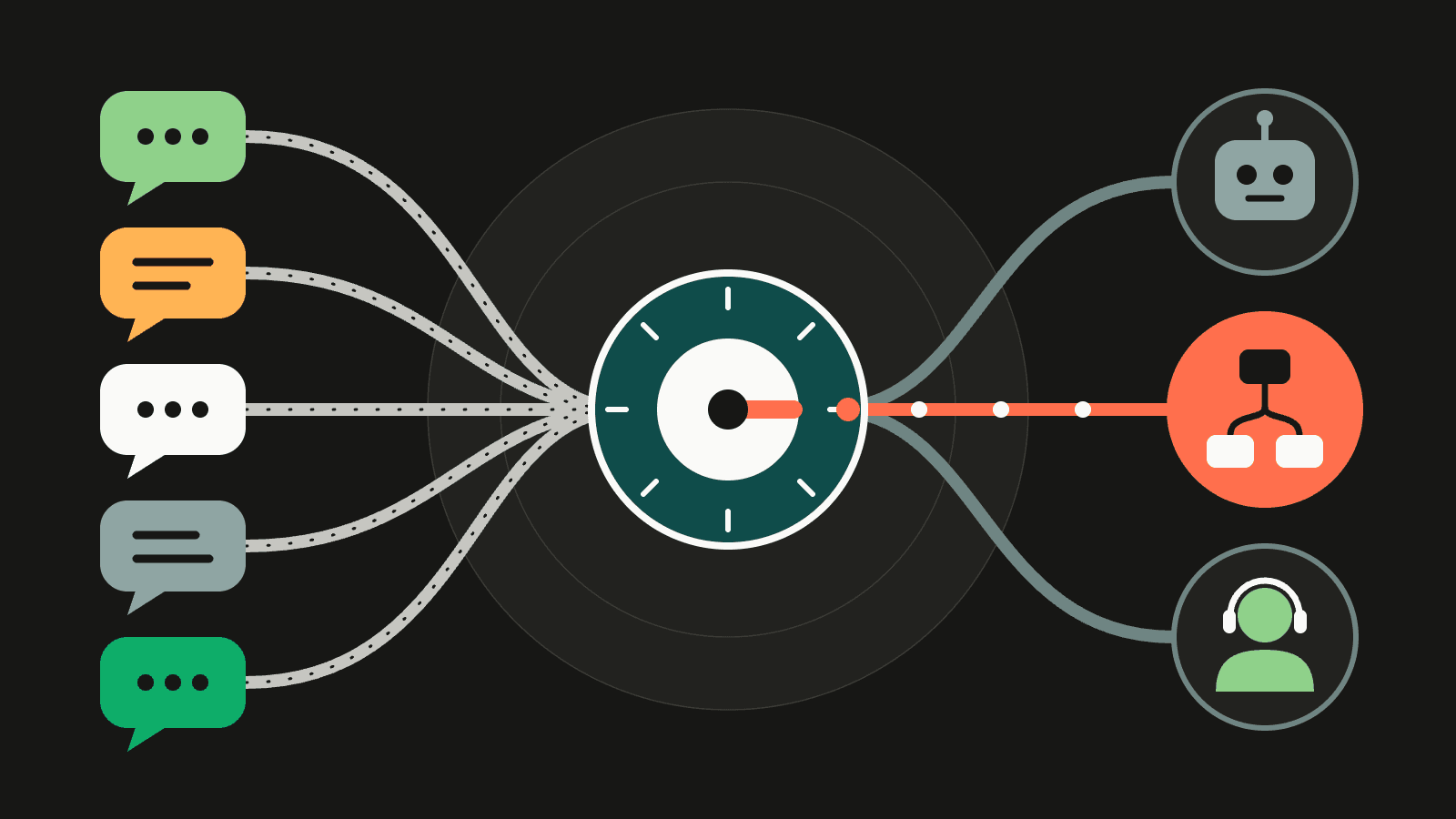
Connecting a bot to five chat apps is deployment. Orchestration is the layer on top that decides, for every incoming message, what should happen next. It has five jobs:
- Intake: messages from every channel arrive in one system, not five separate apps.
- Assignment: the system decides which bot answers. A sales bot and a support bot should not both reply.
- Routing: some messages get a fixed reply, some go to AI, and some start a multi-step flow.
- Handoff: when a person is needed, the bot stops and a teammate continues with the full history.
- Review: you can see what ran, where it stalled and what needs attention.
If a tool does the first job but not the other four, you have a multi-channel bot, not an orchestrated one. We covered the deployment side on its own in how a chatbot handles multi-channel deployment.
Enterprise platforms: when you need them
The three enterprise vendors in the table are built for a different scale. Their pages talk about voice alongside chat, several specialist AI agents under one orchestrator, and escalation into a staffed contact center. That matters if you run phone support, have dozens of agents on shifts, or need different AI agents for billing, bookings and technical help that pass context to each other.
The trade-off is setup. These platforms are usually sold through a sales conversation, and projects on them tend to involve developers or an implementation partner. If your team is five people answering WhatsApp and website chat, most of that power will sit unused.
Signs you are in enterprise territory
- Phone calls are a main support channel and must be handled in the same system as chat.
- You need several specialist AI agents that hand work to each other mid-conversation.
- You have workforce needs such as shifts, queues and skills-based assignment across a large team.
How BoundBot handles orchestration for smaller teams
BoundBot is a no-code platform, so orchestration is done with a handful of settings in the dashboard. Everything below comes from the public docs, checked on 26 November 2026.
Swipe to view all columns →
| Orchestration job | How BoundBot does it |
|---|---|
| Intake | A shared Inbox combines conversations from WebChat, WhatsApp, Messenger and Instagram, Telegram, Slack and Discord |
| Assignment | Every channel points to one bot, and that bot handles what comes in through it. You can run a sales bot on one channel and a support bot on another |
| Routing | Keyword rules give a fixed reply when a message matches a pattern. Workflows run multi-step flows. Everything else goes to the AI reply |
| Handoff | The Stop Auto Reply action mutes the bot in one conversation so a teammate can reply from the Inbox |
| Review | Workflows have an Executions view with run history, and the Overview page has a Needs attention panel for stale threads |
Workflows are the orchestration piece
A workflow starts from one of three triggers: a new message, a keyword match or an event. From there you chain steps on a visual canvas: send a message, generate an AI response, wait for the customer's input, branch on a condition, call an API, add a delay, store a variable or capture a lead. You can start from a template, a blank canvas, or a plain-language description that the AI turns into a first draft.
For simpler cases, keyword rules are enough. Each rule belongs to one bot and replies the same way every time a pattern matches. Our guide to routing chatbot messages by topic or keyword shows where rules end and workflows begin.
A hypothetical example: Picture a small language school with a website and a WhatsApp number. An admissions bot sits on the website and a student-support bot sits on WhatsApp. A keyword rule answers "term dates" instantly. A workflow triggered by the word "enrol" asks for the course and level, captures the lead, then sends the details to the school's own system with an API call. If a parent asks about a refund, the bot stops replying and the office manager picks up the thread in the Inbox. The school is invented; each piece is a documented BoundBot feature.
What BoundBot does not do
BoundBot's docs list no voice or SMS channel, so it is not a replacement for a phone contact center. It also does not describe the multi-agent setup the enterprise vendors advertise, where specialist AI agents pass a conversation between themselves. In BoundBot, one bot owns each channel. The docs do not say which plans include workflows, so confirm that in the app before you plan around them.
What it costs to start
Enterprise vendors typically price through a sales team, so compare quotes directly. BoundBot's pricing page showed these plans when we checked on 26 November 2026, with the paid ones marked as 67% off:
- Free: $0, 1 bot, a website chat widget.
- Starter: $9.99 per month, up to 3 bots, with Telegram, WhatsApp, Messenger and WebChat.
- Pro: $29.99 per month, up to 10 bots, adds Slack and Discord plus MCP integrations.
- Business: $199.99 per month, unlimited bots and team members.
Discounts change, so read the page itself before you budget. The channels overview in the docs explains what each channel needs before you can connect it.
How to shortlist an orchestration vendor
- List your channels and mark which ones are voice. If voice is essential, start with the contact-center platforms.
- Count the bots you need. One per brand, or one for sales and one for support, is a common pattern.
- Write down your three most common conversations and decide for each: fixed reply, AI answer, multi-step flow or human.
- Ask every vendor to show a handoff live. Check that the teammate sees the full history and that the bot stays quiet afterwards.
- Ask who will maintain the flows. If the answer is "nobody technical", a no-code builder matters more than a long feature list.
- Pilot on one channel for two weeks before connecting the rest.
For a wider product comparison, see our roundup of multi-channel chatbot platforms.
Frequently asked questions
What platform should I use for AI chatbots across multiple channels?
Match the platform to your channels and team size. A small team on website chat and messaging apps is usually well served by a no-code platform with a shared inbox. A large support operation with phone lines should look at contact-center platforms first.
Which tools handle customer questions from multiple channels?
Any tool with a shared inbox and one bot behind several channels can do it. The detail to check is whether each channel you need is included in the plan you would buy, since messaging apps are often limited to paid tiers.
What types of platforms handle chatbot escalations while keeping customer history across channels?
Look for platforms where the bot and the human agent work in the same conversation thread. In BoundBot, a muted conversation stays in the Inbox with its full message history, and paid plans add an AI summary so a teammate can catch up quickly.
Is chatbot orchestration different from an omnichannel inbox?
Yes. An inbox collects conversations in one place. Orchestration adds the rules that decide what happens to each one: which bot replies, which flow runs and when a person takes over. Many products include both, but check for the second part.
A sensible next step
Sketch your own version of the five jobs on one page: intake, assignment, routing, handoff and review. If your sketch fits web chat and messaging apps, you can try it on BoundBot's Free plan with one bot on your website, then add channels and a first workflow once the answers look right.
LAUNCH THE AGENT. KEEP THE HUMAN CONTROL.
START FREE, CONNECT A CHANNEL, AND SHIP YOUR FIRST BOUNDBOT IN MINUTES.