How Does a Chatbot Handle Multi-Channel Deployment Across Websites, Messenger, and Slack?
A plain explanation of how one chatbot gets deployed to a website, Messenger and Slack at once: one bot, one connector per channel, and one inbox for your team.
24 Nov 2026•7 min read

SEO & Content Marketing Specialist
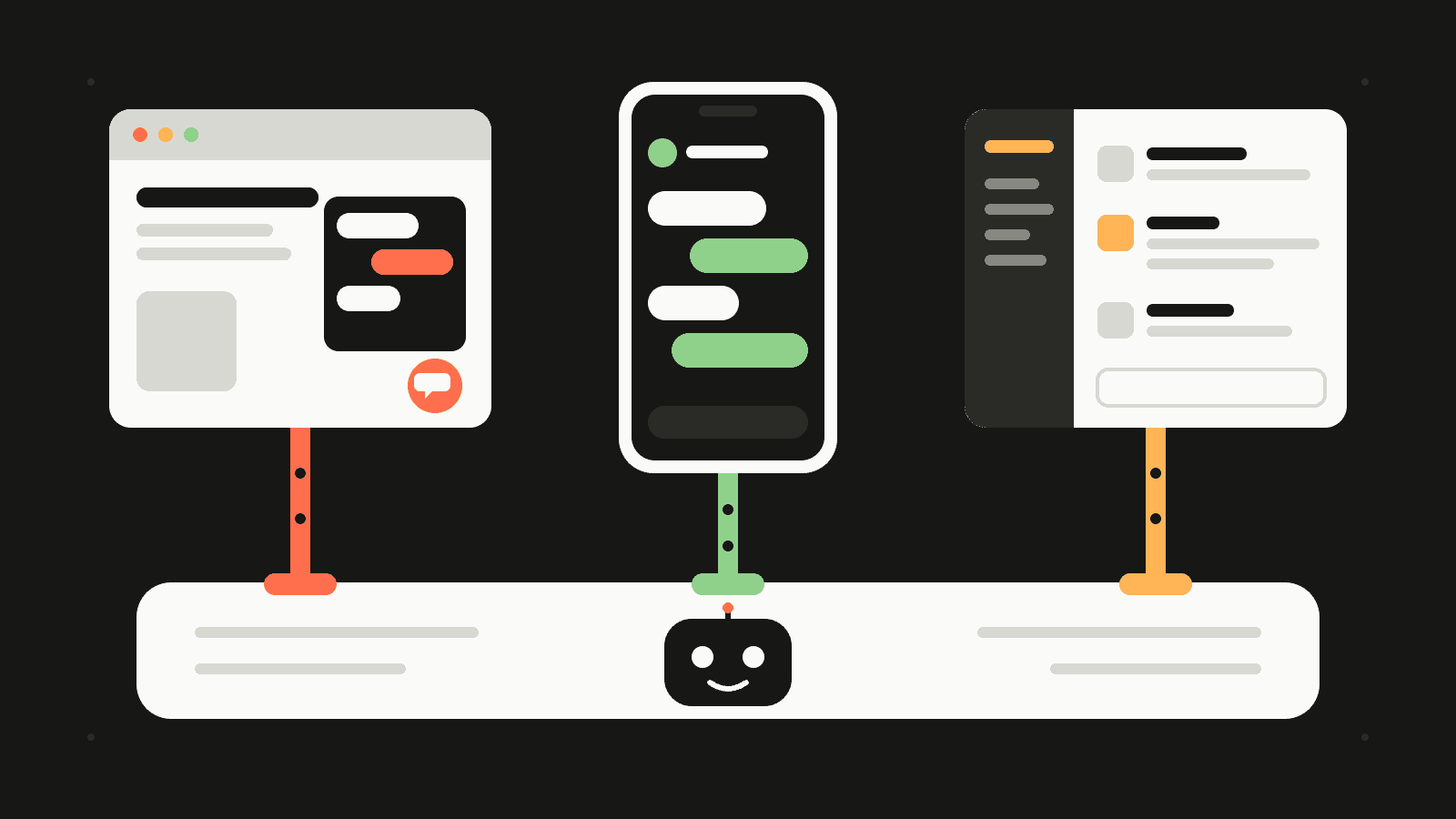
A chatbot handles multi-channel deployment by keeping one bot in the middle and adding a separate connector for each place customers write to you. The bot holds the instructions and the knowledge. The website widget, the Messenger Page and the Slack workspace are each a thin connection that passes messages in and replies out, and every conversation lands in one shared inbox for your team.
So you do not build three chatbots. You build one and connect it three times. The rest of this guide walks through what that looks like on each channel, what stays the same, what changes, and where it tends to go wrong. Product details come from the BoundBot docs and pricing page, checked on 24 November 2026.
How a chatbot handles multi-channel deployment, in three layers
Almost every multi-channel chatbot platform is built the same way, whatever the vendor calls the parts.
- The bot. Its instructions, tone and knowledge sources. This is the only place you write answers.
- The channels. One connection per customer-facing app. Each one receives a message, hands it to the bot, and sends the bot's reply back in that app's format.
- The inbox. One list of every conversation from every channel, where a person can read, reply or take over.
BoundBot follows this pattern. Its docs define a channel as the connection between BoundBot and a customer-facing platform, and say that every channel points to a bot. The channels overview lists six channel types: WebChat, WhatsApp, Messenger (marked Beta), Telegram, Slack and Discord. This article stays with the three in the question.
What deployment looks like on each channel
The bot is shared, but each channel is connected in its own way, because each app has its own rules about who may send messages on your behalf.
Swipe to view all columns →
| Channel | How it connects in BoundBot | Plan it starts on (pricing page, 24 Nov 2026) | First test to run |
|---|---|---|---|
| Website (WebChat) | Create a WebChat channel, pick the bot, paste the embed code on your site | Free | Open the Playground, then the live page |
| Messenger | Sign in with Meta, approve permissions, choose the Facebook Page | Free lists 1 Messenger Page | Send "Hi" to the Page from a different account |
| Slack | Click Continue with Slack and approve BoundBot for the workspace | Pro | Try it in a private channel first |
Website
The website channel is a chat widget. In BoundBot it is called WebChat and it works with a public key that identifies your widget. You can optionally list the domains that are allowed to embed it, so the widget cannot be copied onto someone else's site. Theme, position, colours, bubble label and starter suggestions are set in the dashboard, and a WordPress plugin is available if you would rather not paste code.
Messenger
Messenger has no embed code. You grant access instead. The Messenger setup guide has you pick a bot, continue with Meta, approve the requested permissions and choose the Facebook Page. After that, new Messenger threads appear in the inbox with the Page name attached. The docs label this channel Beta, so test it before you announce it.
Slack
Slack connects through an authorization screen too. You choose the bot, approve BoundBot for a workspace, and the bot replies inside that workspace. The Slack and Discord guide describes Slack as the fit for internal teams and operators, and both channels need the Pro plan or above. For customer communication, that usually means a workspace your customers or partners already belong to, not the general public.
What stays the same on every channel
This is the part that makes multi-channel deployment worth doing. When all three channels point to the same bot, these things are shared:
- The answers. The bot reads the same FAQs, files, website sources and products wherever the question arrives. Fix an answer once in the knowledge base and it is fixed everywhere.
- The instructions. Tone, limits and "when to hand over" rules live in the bot, not in the channel.
- The inbox. BoundBot's Inbox combines messages from every connected channel. You can filter by channel, see where each thread came from, and send a manual reply.
- The handoff. Muting auto reply on a conversation stops the bot in that thread until a teammate turns it back on. It works the same way whichever channel the thread started in.
What changes from channel to channel
The bot is one, but the rooms it speaks in are different. Plan for these differences before you go live.
Who is on the other side
A website visitor is often anonymous and may leave in a minute. A Messenger user has a profile and can reply tomorrow. A Slack user is a named member of a workspace. The same answer can be right in all three places, yet the follow-up differs: on the website you may want to collect contact details early, while in Slack you already know who is asking.
Rules set by the app
Messaging apps decide when a business may reply. Meta's Messenger Platform policy says a business can respond during a standard messaging window that, for most user actions, lasts 24 hours. A website widget has no such window, because the visitor is on your own page. This matters for slow replies: a human follow-up on Messenger two days later may not go through as a normal message.
Conversation history
Treat each channel thread as its own conversation. BoundBot's docs describe one inbox for all channels, but they do not describe merging one person's website chat with their Messenger thread. If a customer switches apps halfway through, assume the bot starts fresh and let your team connect the two from the inbox.
A hypothetical example: Picture a small software company. Its bot answers pricing questions on the website, replies to Facebook Page messages in Messenger, and sits in a Slack workspace shared with its larger customers. A refund policy changes on Monday. The owner edits one FAQ, and all three channels give the new answer. The company is invented for illustration; the mechanics are the ones described above.
A rollout order that avoids surprises
- Build the bot and its knowledge first. A weak bot on three channels is three times the problem.
- Connect the website channel and test it. It is the quickest to set up and the easiest to check yourself.
- Add Messenger, then send a test message from an account that does not manage the Page. Confirm the thread shows in the inbox and the right bot answers.
- Add Slack last, in a private channel, and widen access once replies look right.
- Check channel status after each step. BoundBot shows each channel as Active, Disconnected or Error, so a broken connection is visible before a customer finds it.
- Agree who watches the inbox, and when. The bot covers the common questions; someone still has to pick up the rest.
Common mistakes with multi-channel chatbot deployment
- A different bot per channel. It feels tidy, but answers drift apart within weeks. Use one bot unless the audiences really need different content.
- Counting channels before checking the plan. Slack and Discord sit on Pro in BoundBot. Read the pricing page for the plan you would actually buy.
- Launching everywhere on the same day. If something breaks you will not know which connection caused it.
- No handoff rule. Decide which requests go to a person, and write that into the bot's instructions.
If you are still choosing a product, our comparison of multi channel chatbot platforms looks at ten tools for teams that manage four or more channels.
Frequently asked questions
What platform should I use for AI chatbots across multiple channels?
Choose one where a single bot can be attached to every channel you need and all conversations reach one inbox. Then check that those channels are included in the plan you can afford. BoundBot covers a website widget, WhatsApp, Messenger, Telegram, Slack and Discord, with the last two on Pro and above.
Which chatbot platform supports SMS, WhatsApp, and web?
Some platforms offer all three, so check each vendor's channel list directly. BoundBot supports WhatsApp and a website widget. Its public docs did not list an SMS channel when checked on 24 November 2026, so it is not the right pick if text messages are a must.
Are there any platforms designed to unify all message channels?
Yes, this is what a shared inbox does. Messages from each connected channel arrive in one list, labelled with where they came from. No platform connects to every app that exists, so start from the apps your customers use today and confirm each one by name.
A sensible next step
Start with the channel where most of your questions arrive, which for many small businesses is the website. BoundBot's Free plan is enough to put one bot on your site and see how it answers from your own content. Add Messenger and Slack once the first channel behaves the way you want.
LAUNCH THE AGENT. KEEP THE HUMAN CONTROL.
START FREE, CONNECT A CHANNEL, AND SHIP YOUR FIRST BOUNDBOT IN MINUTES.