What Solution Allows Routing Chatbot Messages by Topic or Keyword?
Keyword rules route on exact wording, workflows route to multi-step flows, and AI actions route by topic. Here is how each one works and when to use it.
21 Nov 2026•8 min read

SEO & Content Marketing Specialist
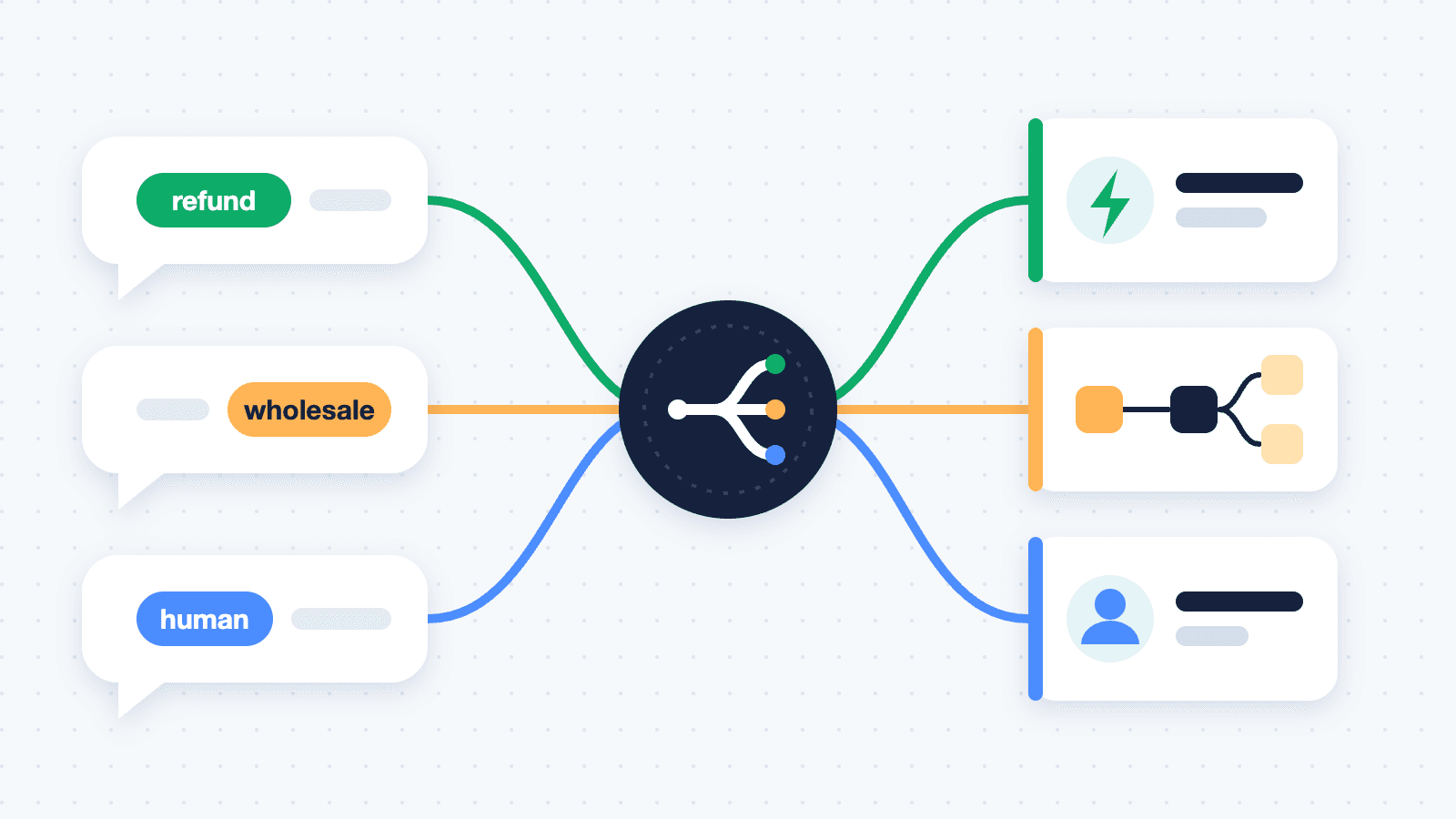
A chatbot platform with keyword rules and a workflow builder is the kind of solution that routes chatbot messages by topic or keyword. Keyword rules send an exact, pre-written reply when a message contains a word or pattern you choose. Workflows and AI actions handle the looser idea of a topic by sending the conversation into a multi-step flow, a lead form, or a handoff to a person. BoundBot has all three, and this guide shows how each one works and where the limits are.
Everything said about BoundBot here was checked against the live BoundBot docs and pricing page on 22 November 2026.
Routing chatbot messages by topic or keyword: the short version
Routing means deciding what should handle a message before anyone replies. For a small team, there are usually four possible destinations: a fixed answer, a guided flow, the AI agent, or a human. The method you pick depends on how predictable the message is.
Swipe to view all columns →
| Routing method | What triggers it | Where the message goes | Best for |
|---|---|---|---|
| Keyword rule | A word or pattern in the message | One fixed reply | Office hours, refund policy, shipping cutoff |
| Workflow | A keyword match, any new message, or an event | A multi-step flow with branches | Quotes, bookings, lead capture |
| AI action | The AI agent judging what the person wants | A button, lead form, booking, API call, or human handoff | Requests phrased in many different ways |
| Channel to bot | The channel the message arrived on | The bot connected to that channel | Separate sales and support bots |
Keyword routing is exact and predictable. Topic routing is flexible but depends on the AI reading the message correctly. Most teams end up using both: rules for the handful of phrases that must always get the same answer, and AI for everything else.
Keyword rules: route on the exact words
In BoundBot, a keyword rule is tied to one bot and has four parts: a pattern, a match type, a response, and an on or off switch. When an incoming message matches the pattern, the bot sends the response. The docs describe rules as a simple first layer before AI reasoning, which is the right way to think about them.
There are three match types:
- Contains fires when the pattern appears anywhere in the message. A rule for refund matches both I want a refund and what is your refund policy.
- Exact fires only when the whole message equals the pattern. Useful for menu style replies such as a customer typing 1 or HOURS.
- Regex fires on a regular expression, which is a small pattern language for matching text. One rule with the pattern refund|return|money back covers all three phrases. Mozilla has a clear guide to regular expressions if you have not written one before.
The Free plan includes 5 keyword rules with the Contains match type only. Paid plans add Exact and Regex. The number of rules on each plan is in the plan table further down.
Keep patterns narrow: A Contains rule for the word order will also fire on in order to and border. Test each rule against real customer messages from your inbox, and switch off rules that overlap with each other.
Workflows: route a keyword into a multi-step flow
A keyword rule can only send one reply. When the right response is a short conversation, use a workflow. Every BoundBot workflow starts with one trigger: New message, Keyword match, or Event. A Keyword match trigger is how you route a word such as wholesale or quote into its own flow.
Inside the flow, nodes do the work. The ones that matter most for routing are:
- Condition branches the flow based on logic, so different answers lead to different paths.
- Wait for input pauses until the customer replies, which lets you ask a follow-up question.
- Lead capture saves the person's details so sales can follow up.
- API call sends an HTTP request, which can pass the conversation details to another system you run, as long as that system accepts HTTP requests.
- AI response hands a step back to the AI when a fixed message would be too rigid.
You can start from a blank canvas, describe the flow in plain language and let AI draft it, or use a template such as Lead Capture Fast or Demo Booking.
AI actions: route by topic when the wording varies
Customers rarely use the word you expect. Someone who wants a person might write can I talk to someone, this bot is not helping, or is anyone there. No keyword list catches all of that. This is where topic routing comes in.
BoundBot actions each have a when to use field, written in plain language, that tells the AI agent when the action fits. The agent reads the conversation and picks the action when the topic matches. The action types are Button, Collect Leads, Cal, Calendly, Stop Auto Reply, and Custom Actions that post collected details to your own API.
Stop Auto Reply is the handoff route. With an instruction such as Use when the customer asks for a human, the agent mutes automatic replies for that conversation, and the thread waits in the Inbox for your team. The bot stays silent there until someone turns auto reply back on.
What routing does not mean here: The BoundBot docs describe routing a message to a reply, a flow, a bot or a human handoff in a shared inbox. They do not describe automatically assigning a conversation to a named teammate or department. If you need assignment queues by skill or shift, ask any vendor to show you that feature before you commit.
Route by channel with separate bots
There is one more kind of routing that needs no rules at all. In BoundBot, every channel points to a bot, and conversations that arrive on that channel are handled by that bot unless you add automation on top. So a support bot can sit behind your WhatsApp number while a sales bot runs in the chat widget on your pricing page, each with its own instructions and keyword rules.
WebChat is available on all plans. The channels overview in the docs lists WhatsApp, Messenger, Instagram and Telegram on Starter and above, and Slack and Discord on Pro and above. For the connection steps, see the multi-channel chatbot setup guide.
A worked example for a small online shop
This is a hypothetical example to show how the pieces fit, not a customer story. A small clothing shop gets three kinds of message all day: refund questions, wholesale enquiries, and people who want a person.
- A Regex keyword rule with the pattern refund|return|money back replies with the shop's return policy and a link to the returns form. Same answer every time, no AI involved.
- A workflow with a Keyword match trigger on wholesale asks how many pieces the buyer needs, waits for the answer, then uses a Lead capture node to save their name and phone number for the sales person.
- A Stop Auto Reply action with the instruction Use when the customer asks for a human or is clearly upset mutes the bot on that thread, so the owner can reply by hand from the Inbox.
- Everything else, such as sizing, delivery times and stock questions, goes to the AI agent, which answers from the shop's knowledge base.
After a week, the owner reads the conversations that went wrong and adjusts. A rule that fired too often gets a narrower pattern. A question that keeps coming up gets added to the knowledge base.
What it costs to set up keyword routing
These figures are from the BoundBot pricing page, checked on 22 November 2026. The paid prices were shown as discounted prices on that date, so confirm them before you plan a budget.
Swipe to view all columns →
| Plan | Price per month | Keyword rules | Match types | Bots |
|---|---|---|---|---|
| Free | $0 | 5 | Contains only | 1 |
| Starter | $9.99 | 20 | Contains, Exact, Regex | 3 |
| Pro | $29.99 | 200 | Contains, Exact, Regex | 10 |
| Business | $199.99 | Unlimited | Contains, Exact, Regex | Unlimited |
The pricing page and docs do not say which plans include workflows, so check inside the app before you build your routing around them.
Frequently asked questions
Is keyword routing or AI topic routing better?
Neither wins outright. Keyword routing never surprises you, but it misses messages that use different words. AI topic routing copes with varied wording, but it can misread a message now and then. Use keywords for replies that must be word for word the same, such as policies and opening hours, and let the AI handle open questions.
Can a chatbot route chats by language, availability or team role?
Some platforms offer this, so ask each vendor directly. For BoundBot, the pricing page lists multi-language support for AI replies, and the docs describe two workspace roles, Owner and Member. The docs do not describe assigning conversations by staff availability, language or role. The team works from one shared inbox and picks up muted threads by hand.
Can support and sales work from the same inbox?
Yes. The BoundBot Inbox is a single view of conversations from your connected channels, with filters for channel and auto reply status. Starter includes 3 team members and Pro includes 10, according to the pricing page. On plans with conversation summaries, a teammate taking over a long thread can read an AI summary first.
Do keyword rules still work when AI credits run out?
The pricing page FAQ says that when credits run out, agents continue to work with non-AI automation, while AI-powered responses pause until the credits reset at the start of the next billing period. It does not list each automation by name, so test your most important rule if you expect to run close to your limit.
A simple next step
Write down the five messages your team answers most often and decide, for each one, whether it needs a fixed reply, a short flow, or a person. That list is your routing plan. You can try the fixed replies on BoundBot's free plan, which includes 5 keyword rules, and if you are still comparing tools, the multi-channel chatbot platforms comparison covers other options.
LAUNCH THE AGENT. KEEP THE HUMAN CONTROL.
START FREE, CONNECT A CHANNEL, AND SHIP YOUR FIRST BOUNDBOT IN MINUTES.