5 Chatbot Mistakes Killing Your Customer Support (And How to Fix Them)
Five common chatbot setup errors can create loops, stale answers, weak handoffs, and inconsistent channel experiences. Use this practical checklist to correct them before they damage customer trust.
18 Aug 2026•6 min read
SEO Content Writer

Mistake #1: No Human Escalation Path (Your Bot Is a Dead End)
A chatbot can reduce repetitive work, but a weak setup can also create loops, missed handoffs, and extra support effort. These customer support chatbot mistakes usually start in configuration, not in a single conversation.
The risk is easy to miss when teams measure only how many messages the bot answers instead of whether customers reach a useful resolution.
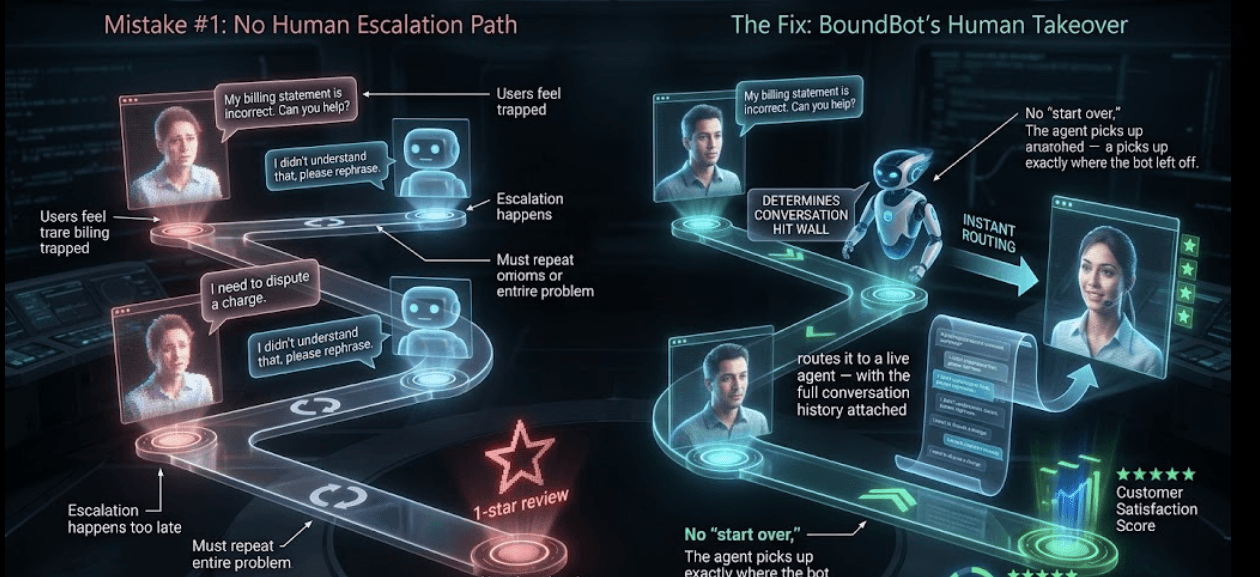
Conceptual comparison of a chatbot dead end and a configured human handoff
Without a clear handoff path, users can get trapped in automated loops, escalate their tone, or repeat the same context after a person joins. Those are separate problems, but they often appear together.
The Fix: BoundBot's Human Takeover
BoundBot keeps conversations in a unified inbox so a teammate can review the thread and take over live. Configure explicit handoff instructions, keyword rules, or workflows for the cases where the bot should stop and a person should step in.
Swipe to view all columns →
| Without a handoff path | With an intentional handoff path |
|---|---|
| Customer may repeat context | Agent can review the thread |
| Frustration may increase | Team can take over live |
| Issue remains unresolved | Ownership transfers to a person |
This matters most for sensitive or complex issues such as billing disputes, account access, and cross-team support. Human takeover should be part of the operating design, not an emergency feature added after launch.
Mistake #2: Generic Responses That Don't Sound Like You
"Hello! I am an AI assistant. I am here to help you with your inquiry today."
Generic language can make even a correct answer feel distant or unhelpful. The goal is not to impersonate a person; it is to make the bot clear, recognizable, and consistent with your support style.
Your brand has a voice. Your chatbot should too.
The Fix: System Prompt Tuning
BoundBot lets you define tone, boundaries, response length, and escalation guidance in a custom system prompt. Use concrete instructions and test them in the Playground before launch.
- Keep the bot consistent with your approved brand voice
- Set response length and format rules
- Remove filler phrases through explicit prompt rules and testing
Mistake #3: An Outdated Knowledge Base

Customer support agent checking an outdated return policy answer
Your return policy changed in January. Your pricing updated last month. Your chatbot? Still confidently quoting the old numbers.
Outdated answers can create follow-up tickets and force agents to correct avoidable misinformation.
A confident wrong answer is often more costly than an honest handoff.
For example, an outdated refund-policy answer can lead a customer to take the wrong action and create a preventable dispute. The safer response is to ground the bot in approved sources and escalate when the policy is unclear.
The Fix: Website Crawling
When you add a website source, BoundBot can discover and crawl its pages for grounded answers. Recrawl manually when important content changes, or enable scheduled auto-recrawl where appropriate; review crawl status and source freshness instead of assuming every website edit is already reflected.
Mistake #4: No Conversation Context (Every Message Starts From Zero)
Customer: "I mentioned this in my last chat." Bot: "Hello! How can I help you today?"
When a system loses the thread inside a conversation, support feels repetitive and disconnected. A useful context layer should preserve key facts while still respecting privacy and retention limits.
Customers shouldn't have to re-explain themselves every single time.
The Fix: Conversation History and Summaries
BoundBot keeps the message thread in the unified inbox and can generate a summary for longer conversations. That context helps AI replies and gives teammates a faster way to review what has already happened within the conversation.
- Message history within the active conversation
- Conversation summaries available to the support team
- Less manual re-reading before a teammate replies
Mistake #5: Using the Same Configuration Everywhere
A WebChat visitor may need guided detail, while a WhatsApp user may expect a shorter exchange. Reusing identical tone, length, and escalation instructions across every channel can make the experience feel out of place.
Accuracy should stay consistent, but presentation and operating rules can change by channel. Test response length, quick replies, and handoff expectations where customers actually contact you.
The Fix: Channel-Specific Bot Configurations
BoundBot channels are connected to a bot configuration, so teams can use different bots or instructions for different channel strategies. Keep knowledge and policy facts consistent while adapting tone, length, and escalation guidance.
Swipe to view all columns →
| Channel | Useful starting configuration |
|---|---|
| WebChat | Guided answers with clear exit and handoff options |
| Concise replies and fast escalation choices | |
| Telegram or Discord | Community-aware replies with moderator or team handoff |
Think about the job each channel serves. A WhatsApp conversation may benefit from shorter replies, while WebChat can support a more guided explanation. Treat these as testable defaults, then adjust them using real conversation and handoff data.
The Common Thread Behind Every Failure
The common pattern is treating AI as a set-and-forget tool. Reliable support automation needs approved sources, clear boundaries, tested handoffs, and ongoing review.
BoundBot combines grounded knowledge, configurable bots, deterministic rules, and a unified inbox so teams can operate that process from one workspace.
FAQs
1. How do I know if my chatbot is actually failing?
Watch resolution quality, reopened conversations, repeat contacts, escalation rate, and satisfaction feedback. Compare trends by channel and intent instead of treating one universal percentage as a pass/fail line.
2. How quickly can I get BoundBot set up?
Setup starts by creating a bot, adding approved knowledge, connecting a channel, and testing the conversation. Launch time depends on source size, channel permissions, and how much review your support flow requires.
3. What happens when the bot doesn't know the answer?
When the bot is unsure, use explicit instructions, keyword rules, or workflows to offer a human path. The unified inbox lets a teammate review the conversation thread before replying.
4. Is BoundBot suitable for small businesses or only enterprises?
BoundBot supports lean teams and larger workspaces through tiered limits for bots, channels, members, knowledge sources, and usage. Choose a plan from your real conversation volume and required controls rather than an assumed daily query count.
Have you reviewed this?
LAUNCH THE AGENT. KEEP THE HUMAN CONTROL.
START FREE, CONNECT A CHANNEL, AND SHIP YOUR FIRST BOUNDBOT IN MINUTES.