BoundBot vs. Tidio vs. Drift: Best AI Chatbot for Small Businesses in 2026
Compare BoundBot, Tidio, and Drift to find the best AI chatbot for small businesses. See setup, pricing, and real lead capture performance.
31 Mar 2026•8 min read

SEO & Content Marketing Specialist
Why Choosing the Right AI Chatbot Matters for Small Businesses
Choosing the right AI chatbot for small businesses is not just a setup decision. It directly affects how quickly you respond, how well you engage visitors, and how many of those conversations turn into real leads.
Most chatbot setups fail quietly. A visitor lands on your website, asks a simple question, and gets a slow or unclear response. Within seconds, they leave without taking any action. This is not a traffic problem. It is a conversation problem. A chatbot that cannot guide users at the right moment will not generate results, no matter how many features it offers.
That is why tools like Tidio, Drift, and BoundBot are designed to go beyond basic replies. While they may look similar at first, they perform very differently when it comes to real lead capture and usability for small businesses.
To make this comparison useful, we did not rely on feature lists. We tested a real scenario by setting up the same lead capture chatbot across all three platforms. Each tool was evaluated based on setup speed, response quality, pricing at SMB scale, channel support, and ease of use.
This guide focuses on how these tools actually perform in practice, so you can choose the chatbot that fits your workflow and helps turn website visitors into leads.
Quick Comparison: BoundBot vs Tidio vs Drift (At a Glance)
If you want a fast answer before going deeper, this snapshot gives a clear starting point. While all three tools aim to improve conversations, they differ in how they handle setup, AI behavior, and lead capture for small businesses.
Swipe to view all columns →
| Tool | Best For | Pricing Level | Setup Speed | AI Strength | Channels |
|---|---|---|---|---|---|
| BoundBot | Growing SMBs needing better AI + multi-channel | Mid-range | Moderate | Strong (knowledge-based AI) | Website, WhatsApp, Instagram, more |
| Tidio | Beginners and small teams | Low (Free plan available) | Fast | Moderate (basic AI + automation) | Website, Messenger, Email |
| Drift | B2B sales-focused teams | High (premium pricing) | Slower | Strong (sales-driven AI) | Website, Email |
At a glance, Tidio is the easiest to get started with and works well if you need something simple and budget-friendly. Drift is built more for structured sales workflows, which makes it powerful but often too heavy and expensive for most small businesses. BoundBot sits in a more balanced position, offering stronger AI behavior with multi-channel flexibility, which becomes important as your business starts handling more conversations across platforms.
This table gives you a quick overview, but it doesn’t show how these tools actually perform when used in a real situation. In the next section, we’ll test all three using the same use case to see which one truly helps capture leads instead of just replying to messages.
How We Tested These Chatbots
To make this comparison useful for real businesses, we did not rely on feature lists or product claims. We tested BoundBot vs Tidio vs Drift using a practical scenario that reflects how most small businesses actually use chatbots, capturing leads directly from a website.
The setup was simple. A service based landing page where a visitor arrives with intent, asks a question like pricing or availability, and expects a clear response. The goal was not just to reply, but to guide the conversation and collect contact details without breaking the flow.
What became clear early on is that all three tools approach this differently.
With Tidio, getting started is fast and straightforward. It works well for basic interactions, especially when conversations follow a predictable path. But when users ask more open or unexpected questions, the experience starts to feel limited.
Drift is built around structured sales journeys. It performs well when you already have a defined funnel, but it requires more setup and is less flexible for quick SMB use cases.
BoundBot takes a more adaptive approach. Instead of relying heavily on predefined flows, it uses a knowledge based system to respond to user queries. This makes a noticeable difference when conversations are less predictable and closer to how real visitors actually behave.
To keep the comparison consistent, we evaluated all three tools using the same criteria:
- Setup speed → How quickly you can go live without technical complexity
- AI response quality → Whether replies feel natural and context aware
- Lead capture flow → How smoothly the bot collects user details
- Ease of use → Can a non technical user manage it daily
- Channel flexibility → Whether conversations can extend beyond the website
The biggest difference is not in features, but in how each tool handles real conversations. Some are designed to respond quickly, while others are built to guide users toward action.
In the next sections, we will break down these differences step by step so you can clearly see which chatbot fits your business and where each platform performs best.
Setup Speed and Onboarding: Which Tool Gets You Live Faster
For most small businesses, setup speed is not just about time. It is about how quickly you can go live without getting stuck in technical steps or complex flows. This is where the difference between tools becomes clear.
With BoundBot, onboarding feels focused on outcomes rather than setup tasks. Instead of building long conversation paths, you start by adding your knowledge source, such as your website content or FAQs. Once that is in place, the chatbot can begin responding based on real information. This removes the need to manually design every possible interaction.
This approach changes how setup works over time. You are not just launching faster, you are reducing ongoing maintenance. As your business grows or your content changes, you update the knowledge instead of rebuilding flows. That makes the system easier to manage without technical support.
In comparison, Tidio is faster at the initial stage. You can go live quickly using templates, which works well for simple use cases. However, as soon as conversations become less predictable, the setup starts to rely heavily on predefined flows. Drift takes a more structured approach from the beginning, which makes onboarding slower and more complex for small businesses that need a quick start.
With BoundBot, the setup feels closer to how real conversations happen. You focus on what customers ask, not on designing logic behind the scenes. This makes onboarding smoother and easier to scale as your needs grow.
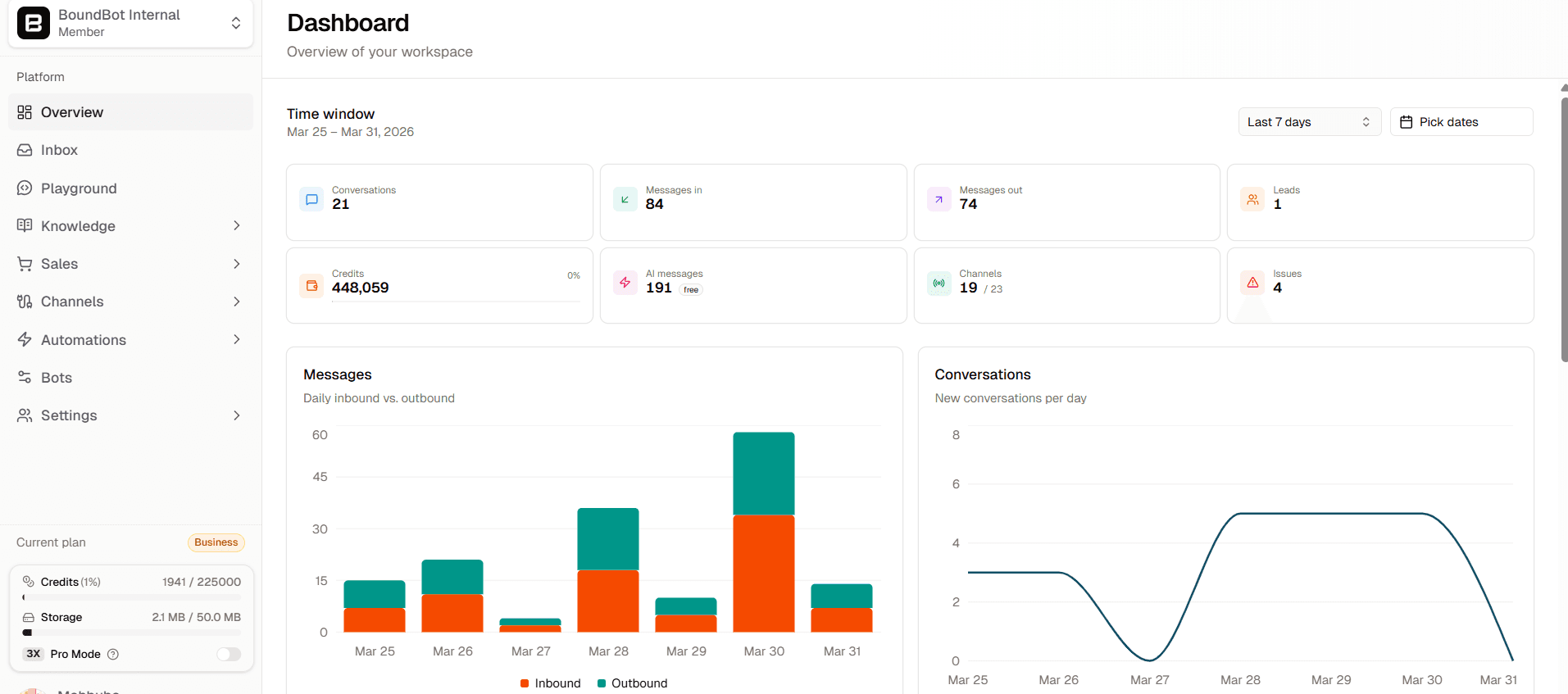
AI chatbot dashboard by BoundBot showing messages, channels, and leads
From a practical point of view:
- You spend less time building flows and more time providing useful information
- You can go live without planning every conversation path in advance
- You can improve responses by updating content, not rebuilding the system
For small businesses, this balance matters. A tool should be easy to launch but also flexible enough to grow with you. BoundBot manages both, which makes it a strong option if you want speed without sacrificing long term usability.
AI Response Quality: Which Chatbot Actually Helps Users Move Forward
Once the chatbot is live, the difference shows up in how it handles real questions. Fast replies are not enough. The response needs to be clear, relevant, and guide the user toward the next step.
With BoundBot, responses are generated from your actual business content, such as website pages or FAQs. This makes answers more aligned with what you offer. When a user asks about pricing, services, or availability, the chatbot can respond with context instead of generic replies. It also handles open-ended or slightly unclear questions better because it is not limited to fixed flows.
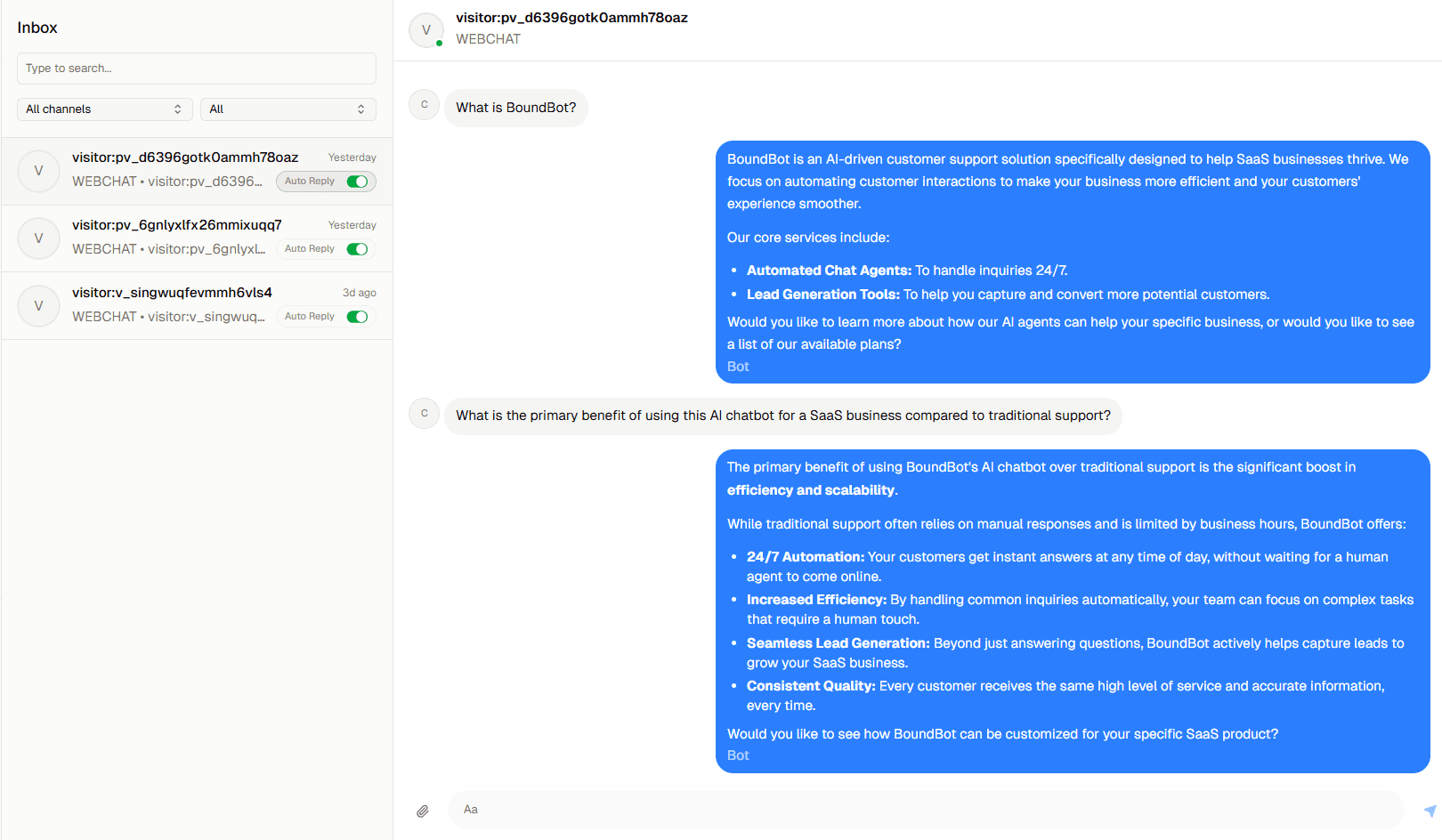
Real conversation example
Tidio combines basic AI with rule-based automation. It works well for straightforward queries when flows are clearly defined. However, if a question falls outside those paths, the response may feel less precise or require manual fallback. This can interrupt the conversation, especially when users expect a direct answer.
Drift focuses on structured conversations, mainly for lead qualification and meeting booking. It performs well when the interaction follows a predefined path, but it is less flexible for handling varied or unexpected questions without additional setup.
In practice, this creates a clear difference. Some tools are better at following a script, while others are better at adapting to how users actually ask questions.
From a practical perspective:
- Context-based responses make conversations feel more useful
- Fewer fallbacks mean smoother user experience
- Flexible replies increase the chances of capturing leads
For small businesses, the goal is not just to answer quickly, but to guide users without confusion. The chatbot that can handle real questions clearly and consistently is more likely to turn conversations into results.
Pricing for Small Businesses: What You Actually Pay
Pricing often looks simple at first, but the real difference shows as your usage grows. For small businesses, the key question is not just the starting cost, but how pricing changes when you handle more conversations and need better features.
Swipe to view all columns →
| Tool | Free Plan | Entry Price | Pricing Model | Key Limitation |
|---|---|---|---|---|
| BoundBot | Yes | Mid-range (after free tier) | free tier) Usage and feature-based | Credit limits on free plan |
| Tidio | Yes | Low | Tiered + usage-based | Limited AI on lower plans |
| Drift | No | High (custom pricing) | Sales-based pricing | Expensive for SMBs |
BoundBot provides a free starting point, which makes it accessible for testing. The difference is in how value is structured. Instead of separating tools or features early, it combines AI responses, multi-channel support, and a unified inbox in one system. As usage increases, pricing scales based on how much you actually use the platform.
Tidio is also beginner-friendly with a free plan and low entry pricing. It works well for simple setups, but advanced AI capabilities and higher limits are tied to paid tiers, which can increase costs as needs grow.
Drift follows a premium pricing model. It is designed for sales teams, and pricing is typically customized. For most small businesses, this makes it harder to adopt without a larger budget.
From a practical perspective:
- Free plans are useful for testing, but come with usage limits
- Costs increase when conversations grow or features expand
- A unified system can reduce the need for multiple paid tools
For small businesses, the better choice is not just the lowest starting price, but the one that stays manageable as your conversations and requirements increase.
Ease of Use: How Easy Is It to Manage Every Day?
Setting up a chatbot is one thing. Keeping it running smoothly every day is where most small businesses struggle. You need to check conversations, make small updates, and make sure responses stay accurate. If that takes too much effort, the tool quickly becomes a burden.
With Tidio, things feel easy in the beginning. The dashboard is simple, and you can edit messages or check chats without confusion. It works well when conversations follow a clear path. But over time, as questions become more varied, you may find yourself going back to adjust different flows again and again.
Drift is more structured. It gives you control, but it also takes time to get used to. Even small changes can feel like a process, especially if you are not working with it every day.
With BoundBot, the experience feels more natural. Instead of constantly fixing or updating flows, you focus on your content. When your information is clear, the chatbot handles most of the conversation on its own. That means fewer manual updates and less time spent managing the system.
From a daily perspective, the difference is simple:
- Some tools need regular tweaking to keep things working
- Some take time before you feel comfortable using them
- Others let you focus on your business instead of the chatbot
For a small business, ease of use is not about how simple a tool looks on day one. It is about how little effort it needs over time. The right chatbot should quietly support your work, not add more to it.
A Simple Way to Choose the Right Chatbot
The best chatbot is not the one with the most features. It is the one that fits how your business works and helps you turn conversations into real leads without extra effort.
If you want something quick and simple, tools like Tidio can get you started. If your focus is structured sales, Drift may be a better fit. But if you need a balance of flexibility, easy management, and more natural responses as your conversations grow, BoundBot stands out.
The next step is simple. Start with a setup that reflects your real business needs, not just features. If you want to see how a chatbot can handle real conversations and capture leads without complex setup, you can try BoundBot and see how it works with your own content.
FAQs About AI Chatbots for Small Businesses
1. What is the best AI chatbot for small businesses in 2026?
The best option depends on your needs. Tidio is good for simple setups, while Drift suits sales-driven teams. For businesses that want flexible AI responses and easier lead handling, BoundBot is a strong choice.
2. Can AI chatbots really increase leads?
Yes, when set up properly. Chatbots can guide visitors, answer questions instantly, and collect contact details. The key is using a system that responds clearly and keeps the conversation moving toward action.
3. Do I need coding skills to use a chatbot?
No, most modern chatbot platforms are designed for non-technical users. You can usually set up and manage them through simple dashboards without writing code.
4. How do chatbots capture leads from a website?
They ask for basic details like name, email, or phone number during a conversation. This usually happens after answering a question or offering help, so it feels natural to the user.
5. Is a free chatbot plan enough for a small business?
A free plan is a good starting point for testing. However, as your conversations grow, you may need better features, higher limits, and more flexibility to get consistent results.
LAUNCH THE AGENT. KEEP THE HUMAN CONTROL.
START FREE, CONNECT A CHANNEL, AND SHIP YOUR FIRST BOUNDBOT IN MINUTES.